Projects
Backwards Design: What Will People Learn in Your Course?
Everyone has their favorite readings, ideas and activities that they might want to pull into their courses. But designing a course is about selecting the right elements that will bring about transformation.
Start with what you want folks to know. Work backwards from there.
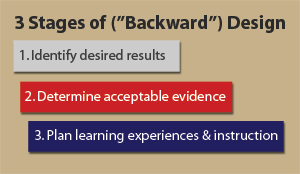
credit: http://techknowtools.files.wordpress.com/2012/04/3stages.gif
- What ideas or skills do you want students to master in your course? Make a list of 3-5.
- Think about what kinds of projects students might complete to show mastery of those ideas or skills. Jot down 1-2 ideas.
- You now have the learning outcomes for your course.
Now you are ready to create (and play with) your modules!
Let’s Make Some Modules!
Now it’s time to start building your course!
- In your GitHub repository, create a folder for every module inside the
modulesfolder. The name of the folder will be reflected in the URLs of your course. If you look at the URL for this page, you will notice the first part of the URL is ‘modules/learning’ and that is also the name of the folder in the GitHub repository. - Inside the folder you just created, create another folder called
_posts. This is the folder that will hold the actual content for your course. Every module can have multiple sections. One of these sections should beprojects. - Create a new file called
2000-01-01-projects.mdinside the_postsfolder for the module you just created. The date part determines the order of the sections in the module. For instance, you can see all the sections for the learning module here.
If you don’t want to create all the folders yourself, rename or copy one of the folders that are already there (start, community, learning, content) and update the sections appropriately.
For modules to show up in the top navigation, you need to update the list modules in https://github.com/your-github-username/course-in-a-box/blob/gh-pages/_data/course.yml.
Update the list of modules to reflect the modules for your course:
modules: [start, community, learning, content, feedback, references]The video below shows all the steps for adding a module called ‘variables’ to a course.
From Learning Goals to Activities
We recall information best when we:
- design for all senses
- build a real-life project that is applicable to our lives
- present that project to others for feedback
- share our ideas with the wider world
For each learning goal / module, design an assignment prompt that’s open-ended and empowers learners to personalize the project.